
Modern homes increasingly rely on interconnected devices to enhance convenience, security, and energy management. The MOES Smart Home Touchscreen Control (1-Switch Panel) positions itself as a central hub, combining voice control, touch interface, and broad device compatibility to streamline everyday tasks and automate routines. Its integration with Smart Life devices and Alexa allows homeowners to manage lights, locks, cameras, and more without juggling multiple apps or remotes.
Expanding Control Across Your Home
One of the key strengths of the MOES Smart Panel is its wide compatibility. By supporting Smart Life devices, it allows homeowners to integrate a diverse range of smart products—from light bulbs and switches to sockets, cameras, and door locks—into a single ecosystem. This reduces fragmentation and provides a unified platform for managing the home environment.
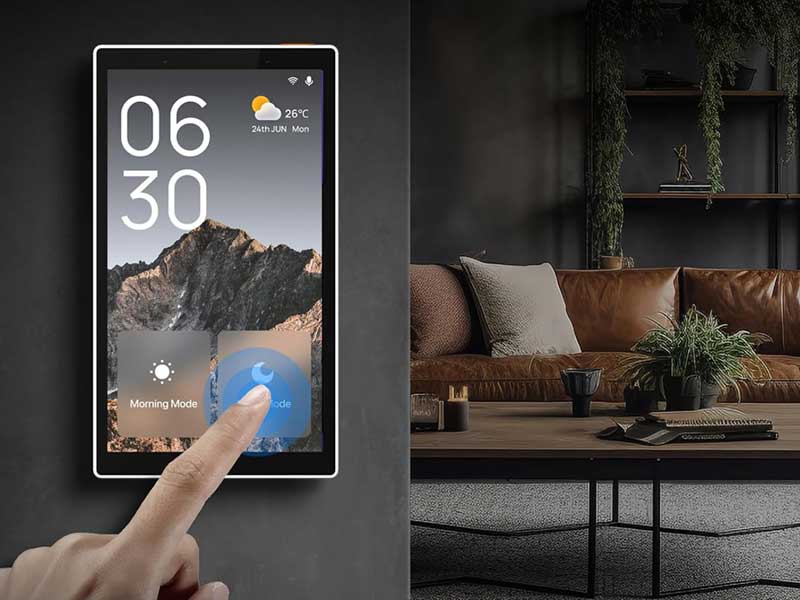
The ability to control multiple device types also means that scenes can be established with ease. For instance, an “Evening Mode” could dim lights, close smart curtains, and activate security cameras with a single touch or voice command. This kind of centralized control is especially useful for households that have incrementally added smart devices over time, ensuring that new gadgets integrate seamlessly with existing ones.
Voice Interaction Simplifies Daily Routines
Built-in Alexa functionality offers hands-free operation, allowing users to control devices, adjust scenes, or even access voice skills without needing a separate smart speaker. This is particularly advantageous in kitchens, living areas, or entryways where hands may be occupied. The voice interface complements the touchscreen, giving users multiple ways to interact with their home systems depending on preference or context.
The combination of touch and voice also enhances accessibility. Guests or family members unfamiliar with specific apps can rely on voice prompts or on-screen controls, minimizing learning curves and reducing frustration. This dual-input approach balances convenience with functionality, supporting both routine and situational commands efficiently.
Centralized Gateway Without Extra Hardware
Unlike many smart home panels that require a separate gateway to communicate with Zigbee-enabled devices, the MOES panel integrates this functionality directly. This all-in-one design simplifies installation and reduces hardware clutter. Localized control improves responsiveness, particularly for Zigbee devices, and ensures that automated routines continue even if the network experiences minor interruptions.
This integrated approach can be a significant advantage for households aiming to minimize technical complexity while maintaining full smart home capabilities. By consolidating functions that typically require multiple devices, the MOES panel reduces setup time and long-term maintenance needs.
Touchscreen Design for Quick Adjustments
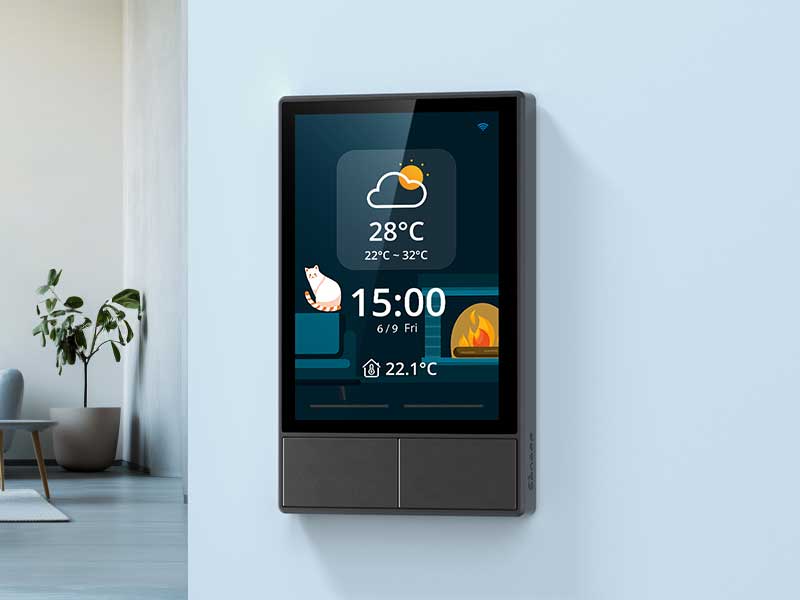
The 5-inch full touch display is the primary interface for direct control. Its size is sufficient for navigating scenes, selecting individual devices, and adjusting settings without feeling cramped. The interface prioritizes clarity, providing easily recognizable icons and intuitive gestures for everyday use.
Users can adjust lighting, check camera feeds, or toggle appliances quickly, making the panel a practical command center rather than a decorative addition. The touchscreen’s responsiveness is particularly relevant in households with multiple users, as it allows for rapid adjustments during routine tasks, from turning on hallway lights to setting a morning alarm scene.

MOES Smart Home Touchscreen Control(1-Switch Panel), In-wall Smart Panel with Alexa Built-in, Compatible with Smart Life devices
Available on Amazon
Flexible Installation Options
MOES has designed the panel to support both wired and wireless connections, accommodating different home setups. Power options include TYPE-C mode and traditional circuit connections, which ensures compatibility with various electrical configurations. This flexibility simplifies integration into existing structures and supports both renovations and new construction.
The dual-network support also allows homeowners to maintain stable connectivity regardless of Wi-Fi reliability. For those managing multiple devices, a consistent and responsive panel interface is critical for avoiding delays in automation and ensuring that scenes execute as expected.
How the Panel Performs in Daily Use
In practice, the MOES Smart Panel delivers a seamless interface for home automation. Managing multiple devices from a single hub reduces the need to switch between apps or physically access multiple devices. Voice control complements touch commands, while the screen itself offers visual confirmation of scene activation and device status.
Security features, such as camera integration and door lock management, are enhanced through the centralized interface. Users can monitor activity or adjust settings without relying on individual apps, streamlining the overall home management experience. Lighting and appliance control benefit similarly, allowing for real-time adjustments that enhance convenience and energy efficiency.
Key Details to Know
While the panel integrates multiple functionalities, it is important to consider network setup and compatibility. Ensuring that devices are registered through the Smart Life platform will optimize performance. Additionally, while Alexa integration provides extensive voice control, full functionality may depend on regional availability and specific voice skills.
The 5-inch touchscreen is designed for general household use, but users should account for placement height and visibility to maximize accessibility. Installing in high-traffic areas such as kitchens or entryways can enhance convenience, whereas mounting in low-traffic or hidden areas may limit interaction opportunities.
Making the Most of the MOES Smart Panel
The panel’s combination of touch, voice, and gateway capabilities allows homeowners to craft sophisticated automation routines. Scene management, device grouping, and scheduled operations all become more manageable, particularly in homes with numerous smart devices. By consolidating control in one location, the panel reduces friction in daily routines and promotes a more cohesive smart home experience.
For households looking to expand automation over time, the panel’s Zigbee gateway integration ensures that new devices can be added without introducing additional hubs. This forward-thinking design supports scalability and minimizes long-term complexity.
Reliability and User Experience
From a reliability standpoint, the MOES Smart Panel provides responsive control and consistent device communication. Localized Zigbee support enhances stability, while dual-network options maintain connectivity even in areas where Wi-Fi signals may fluctuate. The combination of tactile touch and hands-free voice interaction accommodates different user preferences, enhancing overall usability.
For families or multi-user households, the ability to assign scenes, manage access, and interact via multiple input methods ensures that the system remains intuitive and accessible for everyone.
Bringing Smart Home Convenience Together
Ultimately, the MOES Smart Home Touchscreen Control Panel represents a practical and thoughtful approach to centralizing home automation. Its integration of Alexa voice commands, Zigbee gateway functionality, wide device compatibility, and touch interface creates a cohesive command center for modern living.
Whether managing lights, locks, cameras, or appliances, the panel offers homeowners a straightforward, scalable solution to smart home management. By combining hands-free operation with intuitive touch controls, it enhances both convenience and control, supporting a smarter, more connected home environment.
MOES Smart Home Touchscreen Control(1-Switch Panel), In-wall Smart Panel with Alexa Built-in, Compatible with Smart Life devices
Available on Amazon

Lauren is a consumer tech writer who focuses on smart-home topics such as connected devices, home automation, and everyday IoT products. Instead of hands-on testing, she researches product features, user feedback, and long-term trends to produce clear, approachable articles. Lauren enjoys translating technical information into practical advice that readers can trust.