
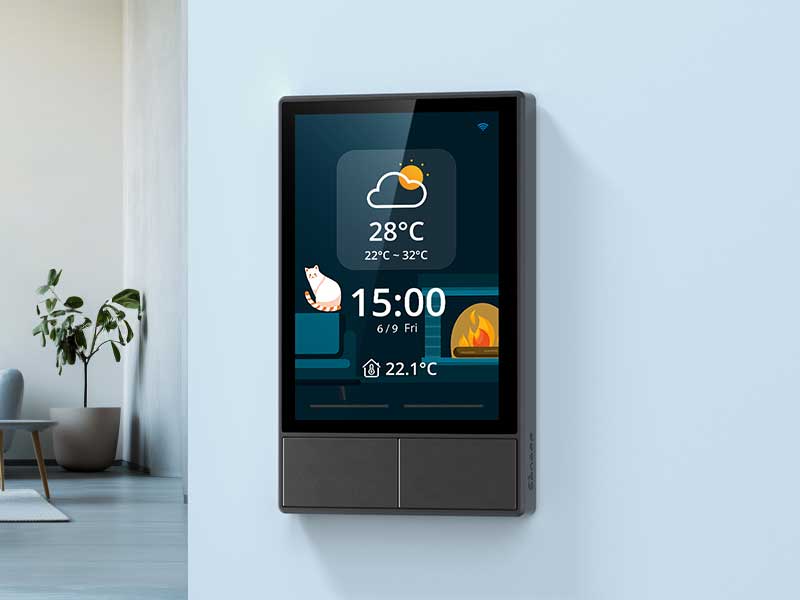
Many smart-home devices promise convenience, yet households often end up juggling multiple apps, remotes, and switches that don’t communicate smoothly. The SONOFF NSPanel Smart Switch takes a different approach by combining lighting control, temperature management, and scene automation into a single wall-mounted interface. It centralizes visibility and interaction, making it easier to understand how devices behave together rather than treating each gadget as an isolated point of control.
Centralized Control Across Multiple Devices
The NSPanel functions as a multi-purpose HMI (Human-Machine Interface), consolidating dual-channel switches, a touchscreen interface, and eWeLink app management. Voice commands work through Alexa, Google Home, and Siri Shortcuts, letting the panel integrate into a variety of existing smart-home setups. This combination reduces the number of standalone devices and makes interactions more predictable for daily routines.
For households with multiple Sonoff devices, centralization is particularly practical. Rather than flipping separate switches or opening different apps for lighting, climate, and outlets, the NSPanel lets users access multiple functions from one consistent interface. Even small households benefit from this simplification, as it reduces the friction of managing a multi-device system.
Scene Management That Keeps Devices in Sync
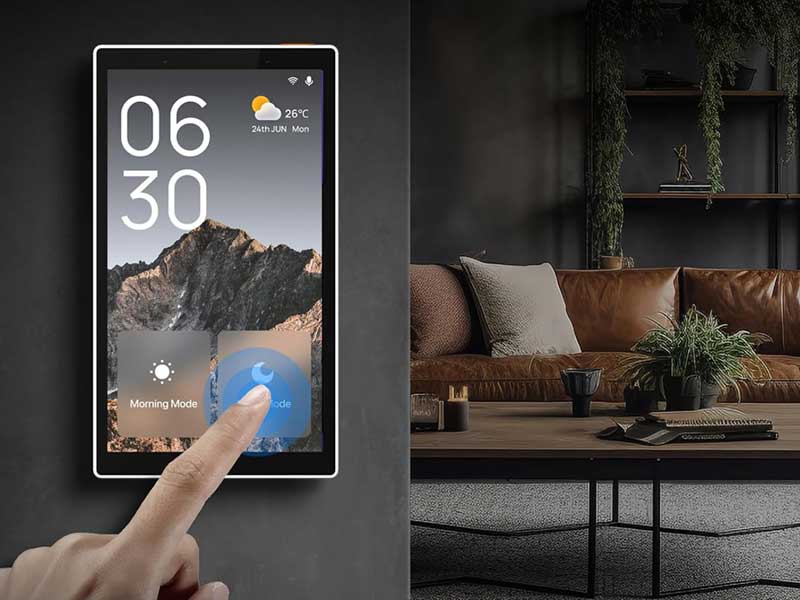
One of the NSPanel’s more subtle advantages is scene control. Instead of triggering devices individually, users can program scenarios such as “Morning Mode” or “Movie Mode” and activate multiple devices simultaneously. Each scene can include lights, outlets, and heating or cooling triggers, responding according to predefined rules.
- Scenes can be customized by time of day, occupancy, or temperature thresholds.
- The touchscreen shows active scenes clearly, providing situational awareness.
- Integration with Sonoff devices ensures that automation commands propagate reliably across the ecosystem.
This approach reduces cognitive load. Predictable scenes allow households to maintain routines without constant manual adjustment, which is particularly useful when multiple people share control of a smart-home system.
Multi-Method Control Enhances Flexibility
The NSPanel provides several ways to interact with connected devices:
- Dual-channel switches on the panel for direct circuit control.
- Touchscreen interface for quick access to scenes, lighting, and thermostat adjustments.
- eWeLink app for remote operation.
- Voice control via Alexa, Google Home, and Siri Shortcuts.
Each control method complements the others. For example, a family member can adjust lights locally while another activates a scene remotely through the app. This flexibility ensures that different users can operate the system comfortably without interfering with each other’s routines.
Thermostat Capabilities Without Extra Complexity
A built-in thermostat extends the NSPanel beyond simple lighting control. Users can set temperature schedules for different periods, and the panel communicates directly with heating or cooling devices to maintain comfort. Unlike standalone smart thermostats that may require multiple apps or cloud accounts, the NSPanel keeps climate control centralized.
Practical implementation considerations include:
- Different temperature settings can be scheduled for morning, daytime, evening, and overnight.
- The thermostat triggers compatible heating or cooling equipment automatically based on set thresholds.
- Local temperature readings are displayed on the panel, reducing the need to open separate apps.
This centralized approach does not replace professional HVAC management but complements it. For homes with multi-zone systems or multiple temperature devices, NSPanel provides visibility and control without additional complexity.

SONOFF NSPanel Smart Switch – 2-Switch Panel Home Control With Touchscreen, Temperature Function, Lights Control
Available on Amazon
Real-Time Environmental Feedback
The NSPanel displays indoor and outdoor temperature, date, time, and local weather updates. While these features may seem basic, they improve situational awareness and make daily adjustments easier. Knowing the current indoor temperature at a glance helps users make informed decisions about climate control, while outdoor temperature information informs scene or thermostat scheduling.
Wi-Fi connectivity is essential for this feature to work reliably. The NSPanel operates on a 2.4GHz network, so placement should consider signal strength to maintain accurate updates and responsive scene activation.
Integration With Existing Smart-Home Ecosystems
Compatibility is crucial for any smart switch to be genuinely useful. NSPanel integrates with Sonoff devices, Alexa, Google Home, and Siri Shortcuts. It works seamlessly within a broader ecosystem, rather than forcing households to rely solely on a proprietary setup.
- Dual-channel switches allow local control of two separate circuits.
- eWeLink app integration adds remote monitoring and control.
- Scenes propagate across linked devices for consistent automation.
This predictable behavior is valuable in homes where multiple users interact with the smart setup. Devices respond according to logic defined in the panel or app, which reduces unexpected interactions and makes the system feel more coherent.
Installation and Everyday Operation
Initial setup involves connecting the NSPanel to a 2.4GHz Wi-Fi network, holding the device for five seconds to enter pairing mode, and adding it to the eWeLink app. Once installed, the touchscreen provides direct access to scene management, lighting, and climate control.
Daily use is straightforward, though there is a short learning curve to manage scenes and temperature schedules. After this adjustment period, operation becomes intuitive: the interface shows current conditions, active scenes, and available controls without clutter or redundant screens.
Practical tips for maintaining reliability include:
- Confirm Wi-Fi coverage at the panel location.
- Ensure connected devices are grouped logically within eWeLink for smooth scene propagation.
- Use the dual-channel switches for local overrides without disrupting programmed scenes.
Balancing Simplicity With Capability
The NSPanel is not about adding complexity. It combines lighting, climate, and scene control into a single interface that emphasizes predictability, visibility, and centralized operation. Households already invested in Sonoff devices or planning a new smart-home setup benefit from a panel that consolidates multiple touchpoints while retaining full functionality.
Its strengths lie in:
- Centralized control that reduces app or device clutter.
- Predictable scene automation that aligns with daily routines.
- Reliable integration with existing smart-home ecosystems.
Limitations are mostly situational: strong Wi-Fi coverage is required, and the panel’s full potential is realized when other compatible Sonoff devices or smart products are in use. Recognizing these conditions ensures users can deploy the panel effectively without disappointment.
One Interface That Keeps Smart Home Management Clear
The SONOFF NSPanel Smart Switch consolidates lighting, temperature, and scene management into a single, predictable interface. It provides a system-friendly approach to smart-home control, helping households maintain coherent automation across multiple devices without unnecessary complexity. For homes looking to centralize functionality while keeping day-to-day operations transparent and reliable, it is a practical, technically grounded solution.
SONOFF NSPanel Smart Switch – 2-Switch Panel Home Control With Touchscreen, Temperature Function, Lights Control
Available on Amazon

Vince is a smart-home systems installer with extensive experience setting up security devices, automation hubs, and connected home ecosystems. He understands integration challenges, performance issues, and what truly improves daily living. Vince writes practical guides that help readers build reliable and user-friendly smart-home setups.